Introduction
The installation documentation describes how to install StarlingX. It introduces key installation concepts, supported deployment models, and the available installation methods. This guide is for system installers and administrators deploying StarlingX in standalone, clustered, or distributed environments.
StarlingX also supports automated virtual installations that can run StarlingX on virtual machines instead of physical servers and use automation to minimize manual setup and configuration. This installation method is optimized for quickly deploying StarlingX in non-production environments and allows users to explore system functionality, test deployment scenarios, and validate configurations without dedicated hardware.
For information on getting started quickly using an automated virtual installation, see Automated Virtual Installation.
Installation Overview
The StarlingX installation process, at a high level, consists of the following tasks:
Prepare servers:
Install and cable the physical servers and configure the local L2 switches to provide the required Layer 2 network connectivity. For other preparation tasks, see Planning for the Installation.
Install StarlingX software on the initial server:
Boot the first server using the StarlingX installation ISO. This results in a non-interactive install of the StarlingX OS and software onto the server’s first disk and ends with the server rebooting into the newly installed OS. This first server will become controller-0 of your deployment.
Bootstrap the StarlingX software on the initial server (controller-0):
Run the Ansible Bootstrap playbook to initialize the StarlingX software on the first server (controller-0). The bootstrap playbook requires a minimal set of configuration values to be defined in the Ansible override file.
When the bootstrap process finishes, StarlingX services are active on controller-0, and all APIs and CLIs can be accessed locally. The system is not yet in service at this stage.
Deploy/Configure controllers and any remaining servers:
This step differs between imperative and declarative deployments. To complete the installation, configure and unlock the controller and bring it into service, along with any remaining servers as the chosen deployment model requires.
Installation Methods and Supported Deployment Models
StarlingX supports two installation methods: an Imperative and a Declarative workflow. Both methods follow the same high-level installation phases but differ in how system configuration is defined and applied.
While installation methods describe how StarlingX software is installed, deployment models determine how the system is structured and scaled in production. StarlingX supports multiple deployment models, including AIO-SX, AIO-DX, Standard configuration, and Distributed Cloud, allowing organizations to align their installation choices with architectural, capacity, and operational goals. Detailed information on deployment configurations is provided in the Deployment Configurations documentation.
Installation Methods
The installation method defines how StarlingX software components are installed and initialized on the target infrastructure.
Imperative Workflow (CLI Method)
The imperative workflow follows a traditional installation and configuration approach, in which you explicitly execute tasks to achieve a desired deployment state. This workflow provides granular control over each installation step and exposes the full range of configurable system options.
While this method is supported, the declarative workflow is the recommended approach for production deployments, as it enables end-to-end automation and consistency through declarative models.
The imperative workflow is best suited for:
Initial experimentation and learning
Interactive setup and exploration of system behavior
Gaining familiarity with installation concepts and configuration options
The imperative workflow includes preparing servers, installing software on the initial controller, bootstrapping the system, configuring system resources, and deploying additional nodes.
Declarative Workflow (Deployment Manager)
In the declarative workflow, you define configuration using YAML files rather than manual commands or scripts. The declarative workflow simplifies system installation and configuration by defining a desired system state and allowing deployment software to converge the system to that state automatically.
StarlingX provides the Deployment Manager application to support the declarative deployment workflow for the post-bootstrap stages of the installation process. It builds on Kubernetes declarative concepts and uses modular YAML configuration files to describe system, host, and network resources.
Use this workflow if:
You are familiar with StarlingX and Deployment Manager YAML files.
You must deploy multiple similarly configured clouds or subclouds.
You want a repeatable, low-effort configuration approach.
Supported Deployment Models
StarlingX supports multiple deployment models that address different availability, scalability, and storage requirements.
For more information, see Deployment Configurations.
AIO-SX
A single server setup providing controller, worker, and storage functions.
The All-in-one Simplex (AIO-SX) deployment option provides all three cloud functions (controller, worker, and storage) on a single server with the following benefits:
Requires only a small amount of cloud processing and storage power
Application consolidation using multiple containers or virtual machines on a single physical server
Supports the following storage options:
A local internal Rook-managed Ceph cluster (in Controller Deployment Model) using one or more disks for OSDs.
External storage backends can be configured as an alternative or in addition to the local Rook-managed Ceph cluster. Supported external backends include, for example, External NetApp Trident backend, External Dell Storage Array backend.
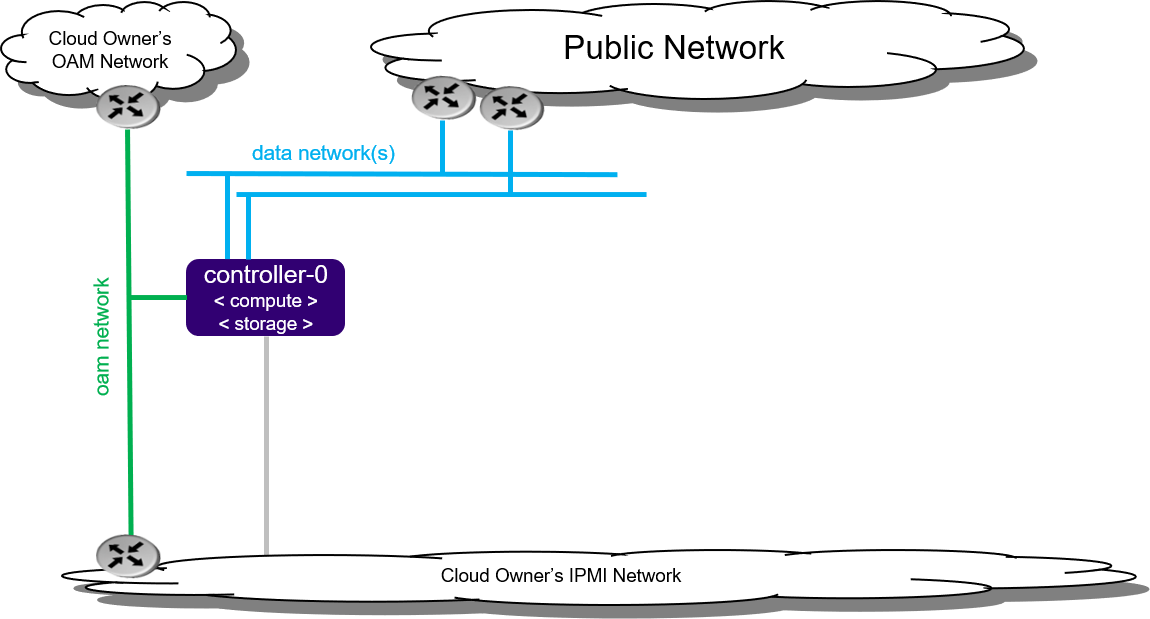
Figure: All-in-one Simplex deployment configuration
AIO-DX
The All-in-one Duplex (AIO-DX) deployment option provides a pair of high availability (HA) servers with each server providing all three cloud functions (controller, worker, and storage).
An AIO-DX configuration provides the following benefits:
Only a small amount of cloud processing and storage power is required
Application consolidation using multiple containers or virtual machines on a single pair of physical servers
High availability (HA) services run on the controller function across two physical servers in either active/active or active/standby mode
A storage back end solution using a two-node Ceph deployment across two servers
Containers or virtual machines scheduled on both worker functions
Protection against overall server hardware fault, where
All controller HA services go active on the remaining healthy server
All containers and/or virtual machines are recovered on the remaining healthy server
Note
If you are behind a corporate firewall or proxy, you need to set proxy settings. Refer to Docker Proxy Configuration for details.
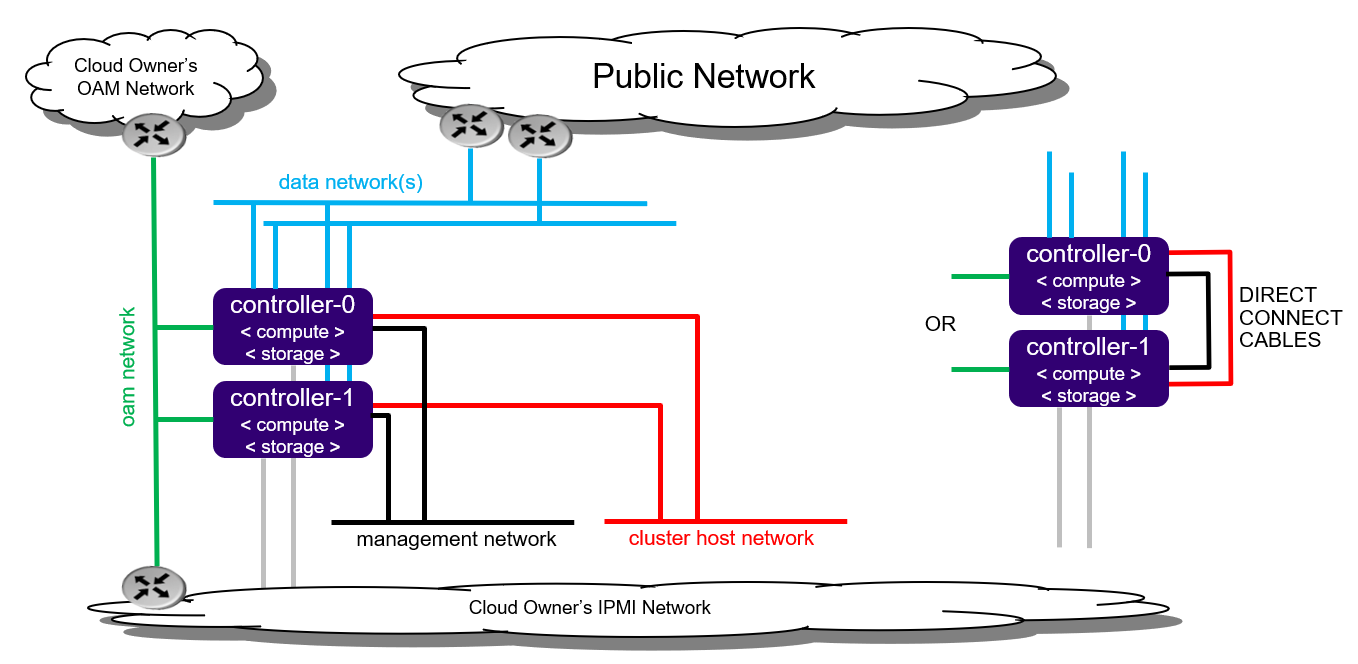
Figure: All-in-one Duplex deployment configuration
Standard Configuration
A standalone cloud designed for scalable and highly available setups, with controllers, a large pool of dedicated worker nodes and Rook-managed Ceph disks distributed across nodes in various storage deployment options.
Overview
The Standard with Rook Storage deployment option is a standard installation with independent controller and worker nodes.
A Standard with Rook Storage configuration provides the following benefits:
A pool of up to 100 worker nodes
A 2x node high availability (HA) controller cluster with HA services running across the controller nodes in either active/active or active/standby mode
A Rook storage back end solution using a two-to-9x node HA Rook storage cluster that supports a replication factor of two or three
Note
If you are behind a corporate firewall or proxy, you need to set proxy settings. Refer to Docker Proxy Configuration for details.
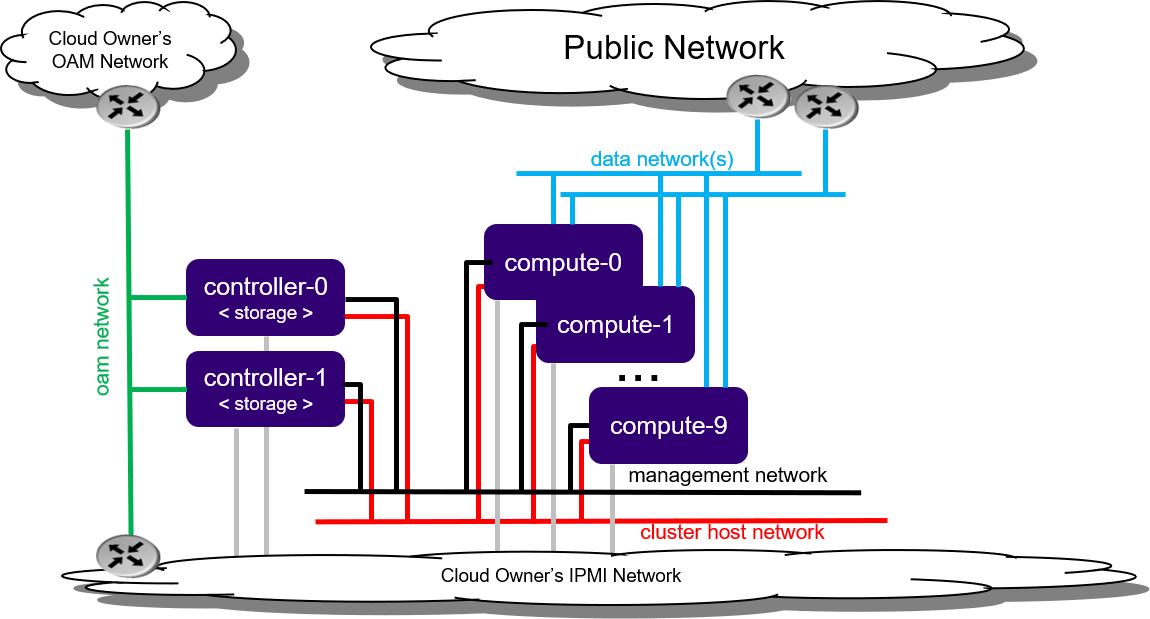
Figure: Standard with Rook Storage deployment configuration
Note
By default, StarlingX uses IPv4. To use StarlingX with IPv6:
The entire infrastructure and cluster configuration must be IPv6, with the exception of the PXE boot network.
Not all external servers are reachable via IPv6 addresses (for example Docker registries). Depending on your infrastructure, it may be necessary to deploy a NAT64/DNS64 gateway to translate the IPv4 addresses to IPv6.
Refer to StarlingX IPv6 Deployment for details on how to deploy a NAT64/DNS64 gateway to use StarlingX with IPv6.
Distributed Cloud
StarlingX supports Distributed Cloud deployments, where a central system controller cloud manages one or more (typically hundreds or thousands) remote subclouds. The central cloud can be either an AIO-DX or a standard deployment configuration, depending on capacity requirements. The subclouds can be any of the single-cloud deployment configurations (i.e., AIO-SX, AIO-DX [+ workers], and/or Standard). Although Distributed Cloud deployments share the core installation concepts outlined in this guide, the declarative method is the default approach for the subclouds as it supports consistent, repeatable configuration across multiple subclouds. For more information on Distributed Cloud architecture, subcloud management, and deployment planning, see the Distributed Cloud documentation.
