Distributed Cloud Configuration
The Distributed Cloud model in StarlingX enables centralized management and orchestration of a geographically distributed network of StarlingX clouds. It is designed to provide flexibility in managing cloud clusters and supporting various deployment architectures.
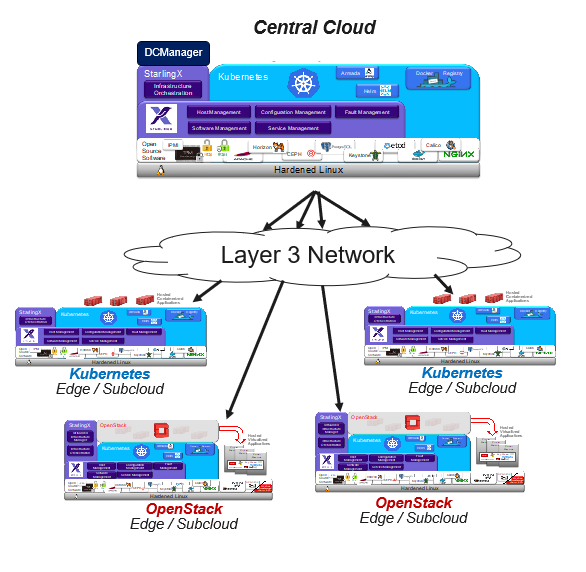
See Deployment Configuration Terminology for a description of common deployment configuration terminology, including definitions of different node types and network types.
Architecture:
A Distributed Cloud system consists of multiple clouds:
A large pool of geographically distributed autonomous clouds (i.e., subclouds), which run the latency or non-latency sensitive workloads at the edge. The deployment configuration of a subcloud can be any of the single-cloud deployment configurations supported (i.e., AIO-SX, AIO-DX with worker nodes, or Standard).
A central cloud (i.e., System Controller cloud) that provides automation and orchestration of lifecycle operations for the geographically distributed subclouds. The central cloud’s deployment configuration can be either AIO-DX with worker nodes or Standard.
Typical Deployment:
Ideal for central locations where workloads are geographically distributed and require efficient centralized management across multiple locations.
Storage Options:
The central cloud and subclouds can each have independent storage options, using either a local, internal Rook-managed Ceph cluster or an external storage backend (for example, NetApp Trident or a Dell Storage Array).
Networking:
The Central Cloud communicates with the subclouds over L3 networks using:
The OAM Interface
and
The MGMT Interface (default) or the Admin Interface.
The admin network is recommended for new Distributed Cloud deployments to facilitate the separation of the system controller to subcloud traffic from the management network.
If IP Address changes are required, the Admin Interface should be used.
